
How I Built thesilentwarrior.org — From Notes to a Structured System
Before I get into the technical journey, I want to acknowledge something important.I started this with zero experience in building a website.
This entire project was built with the help of ChatGPT—through long, back-and-forth conversations, trial and error, debugging sessions, and a lot of questions. What you’re reading here is not something I built in isolation.
It was a collaborative process:
I explored, experimented, and broke things—and ChatGPT helped me reason through them until things made sense.
This blog is as much about that process as it is about the final system.
I strongly beleive in sharing knowledge, having constructive discussions, and improving yourself through that process. What started as a simple idea—“let me put my notes online and share it with other like minded folks”—slowly turned into a system. Not because I planned it that way, but because things kept not working the way I expected.
And each time something broke, I had to understand the why part.
Phase 1: “Just Put Everything in _posts/”
I did research on how to build a website. Few things that came up was to write articles in medium or other similar sites. But this didnt appealed to me as these would be isolated arcticles and miss the structure i desired. So i came to another method to build my website using github pages. So i discussed it with Chatgpt:
what is the simplest way i can build a basic website using github pages.
And the answer was- use the inbuilt Jekyll with Minimal Mistakes theme. My first instinct was simple:
Jekyll has a
_posts/folder → so I’ll put everything there.
So I did:
_posts/
  2025-12-05-Docker-Intro.md
  2025-12-07-Docker-notes.md
And inside each post:
categories: [DOCKER]
This worked… partially.
- Posts showed up
- Pages rendered
- Everything looked fine
As i kept on adding post on different topics at random which included gcp, ml, llm etc, i noticed that there was no proper way of navigating through the posts as it was a sequence sorted via dates mentioned in the filename and not the topics. I needed the structure around topics not dates.
Phase 2: “I Want a Category wise Page”
I didn’t just want posts.I wanted structure:
- A Docker page
- A GCP page
- A ML page
So I created a categories.md and added links like:
[Open DOCKER Index](/DOCKER/)
This is where things broke.
➡️ Clicking the link → 404
Phase 3: The First Realization — URLs Are Not Abstract
I assumed /DOCKER/ was just a label.
It isn’t.
Jekyll maps URLs directly to files.
So this:
/DOCKER/
Only works if this exists:
DOCKER/index.md
That was my first structural shift.
Phase 4: Creating Category Pages (First Fix)
So I created:
DOCKER/
  index.md
And suddenly:
/DOCKER/worked- Navigation worked
Problem solved?
Not really.
Phase 5: “Why Is My Docker Page Empty?”
Now I had a working page… with no content.
I expected Jekyll to automatically show Docker posts there.
It didn’t.
That’s when I added this:
{% assign posts = site.categories.docker | sort: "date" %}
And looped through posts.
Now the posts appeared.
But this raised a deeper question:
Where is
site.categories.DOCKEReven coming from?
Phase 6: The Second Realization — Categories Are Not Folder-Based
At this point, I tried organizing posts like this:
_posts/docker/
  2025-12-05-Docker-Intro.md
Logically, that should define the category.
But it didn’t.
The page was still empty.
That’s when I understood:
Jekyll does not infer categories from folder structure.
This line is what actually matters:
categories: [DOCKER]
Without it in the post file:
- Your posts exist
- But your category page sees nothing
Phase 7: The System Finally Emerges
At this point, everything started making sense.
I ended up with a 3-layer system:
1. Physical Organization (for me)
_posts/docker/
_posts/gcp/
2. Logical Categorization (for Jekyll)
categories: [DOCKER]
3. Custom Rendering (for the site)
site.categories.DOCKER
And category pages like:
DOCKER/index.md
🧠 Visualizing the Architecture
At this point, I needed a mental model to understand what I had actually built.
So I represented it like this:
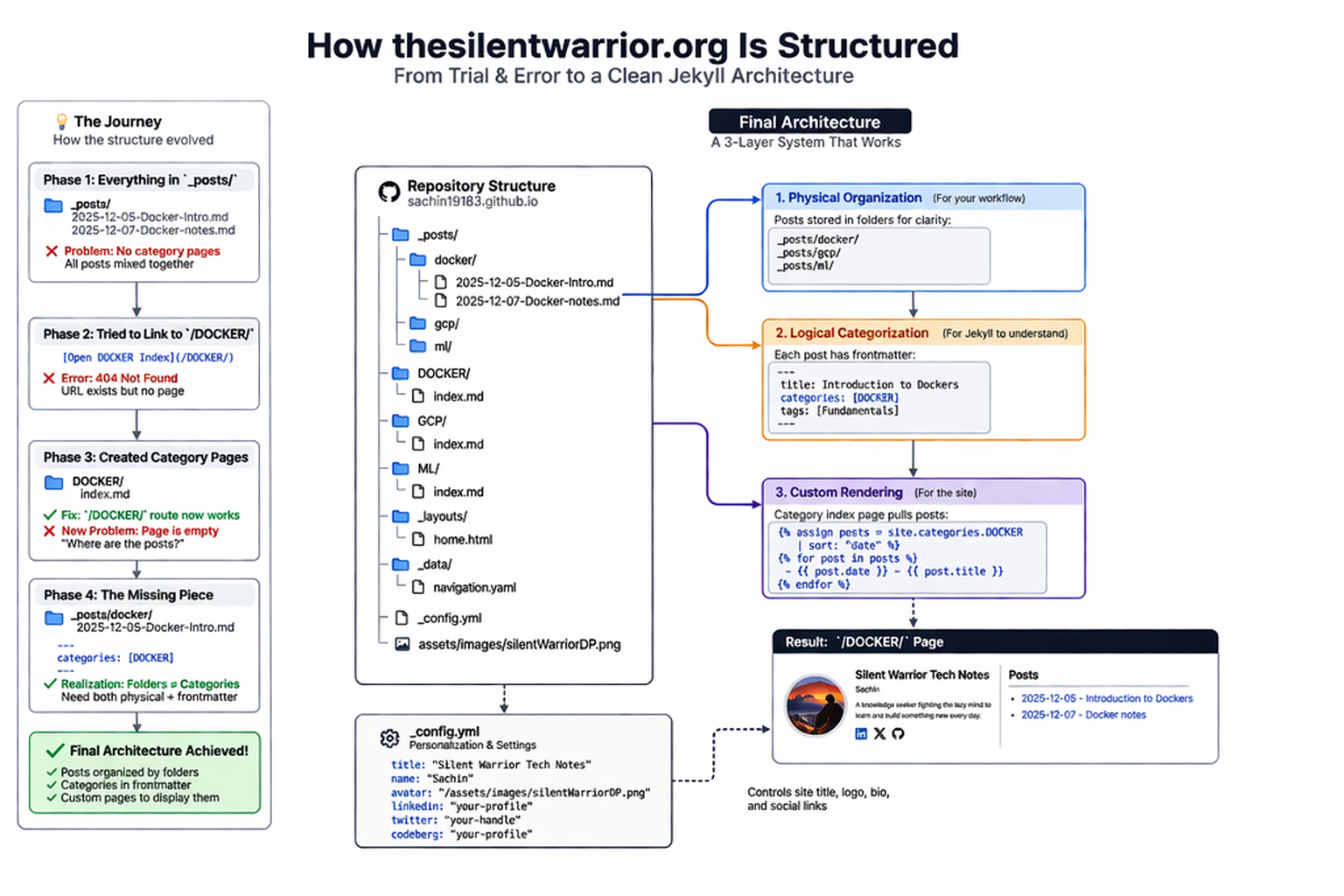
A 3-layer system: physical folders → frontmatter categories → custom rendered pages.
What my repository actually looks like now
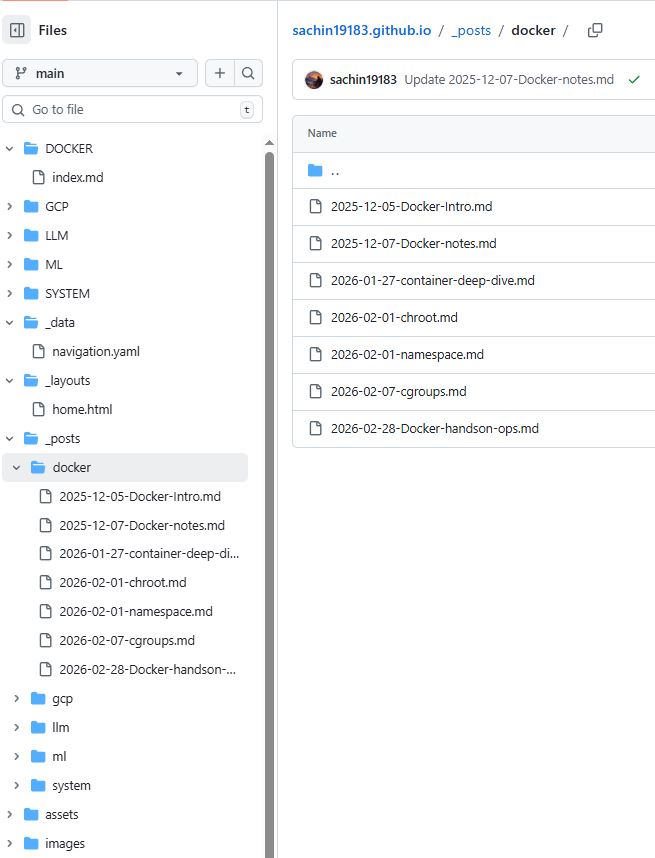
Each category:
- has its own folder
- has its own index.md
- behaves like a mini knowledge hub
Please note that this way is a manual process as if you need a new category, you need to add a new folder in your root (all caps). then add index.md inside it. then within _posts you create another folder with the same name (all small letters) and then within that folder you add your posts in the usaul format. categories.md acts as the entry point.
Why This Was Confusing
Because nothing explicitly tells you this.You assume:
- Markdown links → should just work
- Paths → should resolve automatically
But Jekyll works differently:
- URLs map to files and folders
- Not just strings in your markdown
That mismatch between expectation and reality is where the confusion came from.
Other Pieces That Fell Into Place
Along the way, a few other important things became clearer:
- _posts/ Is Different
Posts live in _posts/ with date-based filenames:
2025-12-05-Docker-Intro.md They support blog-style content and are automatically listed
That’s a completely different system from your category pages.
- _layouts/ Controls Rendering
Your layouts (like home.html) define how everything looks.
So even if content exists, without the right layout: → it won’t appear the way you expect
I didn’t just rely on the theme.I added a custom layout:
_layouts/home.html
And inside it:
- It uses layout: archive
- Pulls content dynamically:
{% assign posts = site.posts | slice: 0, 3 %}
Renders recent posts manually
- _config.yml Is the Glue
This file quietly controls:
- Theme: remote_theme: “mmistakes/minimal-mistakes”
- Site URL: url: “https://thesilentwarrior.org” baseurl: “”
- Plugins:
- jekyll-include-cache
- jekyll-sitemap
- Analytics + verification: google: tracking_id: “G-…”
You don’t notice it—until something breaks.
The Domain Moment
Adding the CNAME file was another small but important step.
CNAME → thesilentwarrior.org
Again, simple in theory.
But only works when:
- DNS is correct
- GitHub Pages picks it up
- HTTPS is enforced
- _config.yml had the right URL
It’s another example of:
Small file. Big impact.
Phase 8: Making the Site Feel Like “Mine”
Once the structure stabilized, I moved to customization.
Inside _config.yml, I added:
Site identity
title: "Silent Warrior Tech Notes"
name: "Sachin"
Domain
url: "https://thesilentwarrior.org"
Theme
remote_theme: "mmistakes/minimal-mistakes"
Then the personal touches:
Avatar
avatar: "/assets/images/silentWarriorDP.png"
Bio
bio: "A knowledge seeker fighting the lazy mind..."
Social Links
- X (Twitter)
- Codeberg
This was the moment it stopped being “a site” and became my site.
Phase 9: Homepage Control
I didn’t want a generic homepage.
So I added:
_layouts/home.html
And controlled:
- how posts are selected
- how many are shown
- how they are rendered
Now the site wasn’t just static content.
It had logic.
What This Journey Actually Taught Me
1. Structure Comes Before Features
2. Jekyll Is Simple—but Not Obvious
3. Organization Has Layers
4. Most Problems Are Silent/Hidden in Plain Sight
What thesilentwarrior.org Is Now
It’s not just a blog.
It’s a structured knowledge system:
- Docker → organized notes
- GCP → categorized learnings
- ML / LLM → evolving topics
- SYSTEM → how everything is built
Final Thought
I didn’t build this in one go.
I built it by:
- trying something
- seeing it fail
- understanding why
- fixing the structure
Over and over again in span of not days but months and somewhere along that process, this became more than a website. It became a system that actually reflects how I learn.
As you browse through the articles, I want to be transparent about one thing: I have taken help from AI primarily to review grammar and occasionally sanity-check technical accuracy. I also learned the markdown syntax from AI and take help for formatting from time to time.
None of the articles are copy-pasted from AI. My purpose here is to learn along the way—not to publish a narrative that I don’t truly understand or own.