
From GOPATH to Go Modules
From GOPATH to Go Modules: How Go Packages Evolved (With a Simple Example)
As my liking is to learn from books, i chose Head First Go, to brush up my golang skills. While i was going through the packages topic. i found it very inconveineint to use the folder strucutre mentioned in the book.
I needed to create a ~/go/src workspace. If i quote the book text here:
The workspace directory isn’t created by default when Go is installed, so you’ll need to create it yourself. Start by going to your home directory. (The path is C:\Users\yournameon most Windows systems, /Users/yournameon Macs, and /home/yournameon most Linux systems.) Within the home directory, create a directory named go— this will be our new workspace directory. Within the godirectory, create a directory named src.
But if you try modern Go today, none of that seems necessary.
So what changed?
In this post, we’ll walk through:
- How Go packages worked before modules (GOPATH era)
- How they work now (Go modules)
- The same example implemented in both styles
🧭 The Old Way: GOPATH Workspace
Before Go 1.11, Go relied on a strict workspace model called GOPATH.
You had to manually create a directory structure like this:
~/go/
  ├── src/
  ├── pkg/
  └── bin/
📦 Where your code lived
All your Go code had to be inside:
~/go/src/
So if you were building a project called myapp, it had to be:
~/go/src/myapp/
🧪 Example (GOPATH style)
Structure:
~/go/src/myapp/
  ├── main.go
  └── mathutils/
       └── add.go
mathutils/add.go
package mathutils

func Add(a int, b int) int {
    return a + b
}
main.go
package main

import (
    "fmt"
    "myapp/mathutils"
)

func main() {
    fmt.Println(mathutils.Add(2, 3))
}
⚠️ Limitations of GOPATH
- You must place code inside
GOPATH/src - No versioning of dependencies
- Hard to manage multiple projects cleanly
- Not flexible for modern workflows
🚀 The Modern Way: Go Modules
With the introduction of Go modules, everything changed.
You no longer need:
GOPATH/src- A fixed workspace
- Manual dependency handling
Instead, Go uses a file called:
go.mod
This defines your project as a module.
🧱 Same Example (Modern Go Modules)
Let’s rebuild the same app the modern way.
Step 1: Create project
mkdir myapp
cd myapp
go mod init myapp
Step 2: Add package
myapp/
  ├── go.mod
  ├── main.go
  └── mathutils/
       └── add.go
mathutils/add.go
package mathutils

func Add(a int, b int) int {
    return a + b
}
main.go
package main

import (
    "fmt"
    "myapp/mathutils"
)

func main() {
    fmt.Println(mathutils.Add(2, 3))
}
▶️ Run it
go run .
🔑 What Stayed the Same?
Interestingly, packages themselves didn’t change much.
- A package is still just a folder
- You still use
package <name> - You still import using
module/package
👉 The concept of packages remained stable.
🔄 What Actually Changed?
| Concept | GOPATH Era | Modules Era |
|---|---|---|
| Project location | Fixed (~/go/src) |
Anywhere |
| Dependency mgmt | Manual | Automatic (go.mod) |
| Flexibility | Low | High |
| Imports | Path-based | Module-based |
🧠 Mental Model (Modern Go)
- Module = your project (defined by
go.mod) - Package = a folder inside your project
- Exported names = start with uppercase
Example import:
import "myapp/mathutils"
myapp→ module namemathutils→ folder
❌ Common Mistake
Trying to use relative imports:
import "./mathutils" // ❌ Don't do this
Always use module-based imports:
import "myapp/mathutils" // ✅ Correct
The folder name we mention during go mod init is the name which is eventually used as the pathname in the code. I by mistake had committed a spelling mistake during go mod init command:
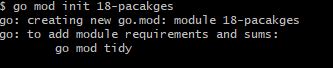
whereas the folder name was :
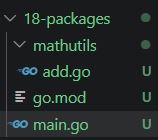
so the import path in code will look like this:
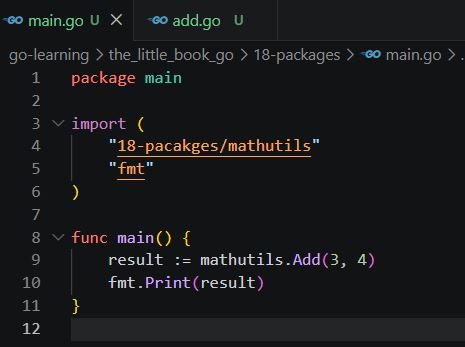
As you can see here, the import path took the name we provided during “go mod init” command..
🟢 Final Thoughts
If you’re following an older Go book, don’t worry—you’re not doing anything wrong. You’re just seeing how Go used to work.
But for real-world development today:
- Skip
GOPATH/src - Use
go mod init - Organize code using folders as packages
Go has become much more flexible—and much easier to work with.
✍️ TL;DR
- Old Go required a strict workspace (
GOPATH) - Modern Go uses modules (
go.mod) - Packages are still just folders
- You can now work from anywhere on your system
If you want to understand more practical stuff on packages and project structure used in big Go projects, consider reading this post: Go visibility across packages
If you’re learning Go today, you’re already using the better version 🚀